Direct Answer
To delete your Amazon account permanently, sign in and open Amazon’s Account Closure page. Review the services and data affected, confirm the closure request, and verify it through the email or text message Amazon sends you. Before closing the account, download important invoices, check pending orders and refunds, and save any content you want to keep.
If you no longer want to use Amazon, you can permanently close your Amazon account and request deletion of your personal information. The process is easy, but you should take a few steps before submitting the request.
When you delete your Amazon account, you may lose access to your order history, invoices, Prime membership, digital purchases, reviews, lists, and other services associated with the account. Amazon also says that a closed account cannot be reopened.
This guide explains how to delete an Amazon account, what to do before closing it, what happens to your data and purchases, and what options you have if you only want to stop using a specific Amazon service.
- How to Delete Amazon Account [Full Guide]
- Can You Delete an Amazon Account From the App?
- How to Delete Your Amazon Account on a Phone
- What to Do Before You Delete Your Amazon Account
- What Happens When You Delete Your Amazon Account?
- Your Reviews and Profile Information Are Affected
- Does Deleting an Amazon Account Delete All Personal Data?
- Can You Recover a Deleted Amazon Account?
- Common Problems When Deleting an Amazon Account
- Problem 1: I cannot find the Account Closure Option
- How Long Does It Take to Delete an Amazon Account?
- Final Thoughts
- FAQ
How to Delete Amazon Account [Full Guide]
The easiest way to delete your Amazon account is to use Amazon’s account closure page. You need to sign in to the account you want to close, review the services connected to it, confirm the deletion request, and verify the request through email or text message.
Here are the steps:
1. Sign In to Your Amazon Account
Open Amazon and sign in to the account you want to delete.
Make sure you are using the correct account. This is especially important if you have more than one Amazon account or use separate accounts for personal and work-related purchases.
If you are already signed in, check the account name or email address before continuing.
2. Open Amazon’s Account Closure Page
Amazon provides a dedicated page for closing an account and requesting the deletion of personal information.
You can access Amazon’s official instructions here:
Amazon account closure instructions
Amazon’s current instructions tell customers to go to the account closure page and sign in to the account they want to close.
Alternatively, click here to open the account closure form and sign in with your account.
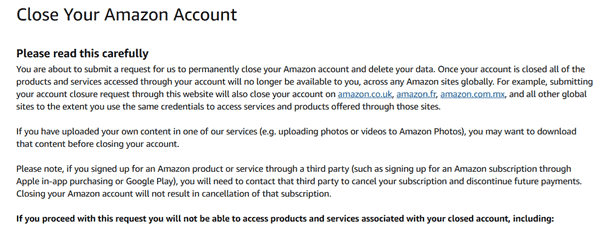
If you cannot find the closure option, use Amazon’s Help section and search for close my account. Amazon’s menus can change, so a direct account-closure page is usually easier than following an old menu path from a tutorial.
3. Review the Services Connected to Your Account
Before you confirm the request, Amazon shows information about products and services associated with your account.
Take a moment to read this information.
Your Amazon login may be connected to far more than shopping. Depending on the services you use, the account can be associated with Prime, Kindle, Prime Video, Amazon Music, Amazon Photos, Audible, Alexa, Amazon devices, reviews, lists, and other Amazon services.
This is one of the most important steps in the process.
If you have used Amazon for years, you may have digital purchases or stored information that you no longer remember having.
4. Choose a Reason for Closing Your Account
Amazon’s account closure page may ask you to select a reason for closing your account.
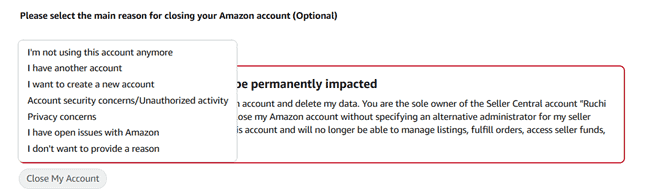
Choose the option that best describes your situation.
The reason does not change the basic process. The important part is confirming that you understand what account closure will do.
5. Confirm Permanent Account Closure
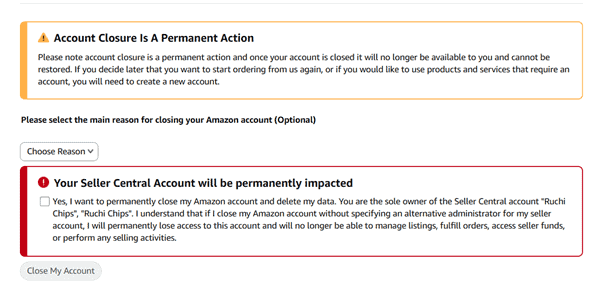
Amazon asks you to confirm that you want to permanently close the account and delete your data.
Read the warning carefully before checking the confirmation box.
Once you submit the request, you should treat the decision as permanent. Amazon states that a closed account cannot be reopened.
6. Verify the Account Closure Request
After submitting your request, Amazon sends a confirmation notification to the email address or phone number associated with your account.
Amazon’s current help page says you need to respond to the notification within five days to verify the request.
Check your inbox and spam folder if you do not see the message.
If Amazon sends the confirmation by text message, check the phone connected to your account.
7. Wait for the Closure to Be Completed
After you verify the request, Amazon processes the account closure and data deletion request.
Do not try to sign in repeatedly while the request is being processed.
Keep the confirmation email or message for your records until you are sure the account has been closed.
Can You Delete an Amazon Account From the App?
You may wonder how to delete an Amazon account directly from the Amazon Shopping app.
Amazon’s current official instructions direct customers to its account closure page rather than to a specific app menu. The app interface can also change as Amazon updates its software.
For this reason, using a mobile browser is a practical option if you cannot find an account deletion setting inside the app.
Open your preferred browser on your phone, sign in to Amazon, and use the official account closure process.
If you are searching for how to delete an Amazon account from the app, remember that deleting the Amazon app from your phone does not delete your Amazon account.
Uninstalling the app only removes the application from your device.
Your account remains active until you submit and confirm an account closure request.
How to Delete Your Amazon Account on a Phone
You can complete the account closure process from a smartphone through a browser.
Follow these steps:
- Open a browser on your phone.
- Go to Amazon’s account closure page.
- Sign in to the account you want to close.
- Review the Amazon services connected to your account.
- Select a reason for closing the account if requested.
- Confirm that you want to permanently close the account and delete your data.
- Select the button to close the account.
- Check your email or phone for Amazon’s verification message.
- Complete the verification within the required period.
The exact appearance of the page may vary based on your Amazon marketplace and device.
Do not worry if your screen does not look exactly like an older screenshot you find in another guide. Focus on the account closure and data deletion options provided by Amazon.
What to Do Before You Delete Your Amazon Account
Before you delete your Amazon account, spend a few minutes checking the information and services you may lose access to.
Account closure is permanent, so it is worth preparing first.
1. Check Your Pending Orders
Look at your current orders.
Make sure important orders have been delivered and there are no unresolved problems that require access to your account.
If an order is still in transit, consider waiting until it arrives and you have checked the item.
This is especially useful for expensive products or items you may need to return.
2. Finish Returns and Refunds
Check your returns page for open returns.
If you have requested a refund, wait until the transaction is resolved if possible.
You should also keep records of important return requests, refund confirmations, and communications with sellers.
Once your account is closed, you lose access to your order history and related account features.
3. Download Your Amazon Invoices
This is one of the most useful things to do before closing your account.
Amazon says you will lose access to your order history and will not be able to print invoices or proof of purchase after the account is closed.
Download invoices for products you may need to return, repair, replace, or claim under warranty.
For example, suppose you bought a web hosting server, laptop, monitor, or networking device through Amazon. Keeping the invoice can make future warranty or support requests easier.
Save important documents somewhere you can access later.
4. Save Photos and Other Uploaded Content
Check whether you have uploaded photos or other personal content to Amazon services.
Amazon recommends downloading content you uploaded to services such as Amazon Photos before closing the account.
Do not assume that content stored in your Amazon account will remain available after closure.
5. Check Your Amazon Gift Card Balance
Review your gift card balance before closing your account.
Amazon’s account closure information says you will not be able to redeem additional Amazon Gift Cards after the account is closed.
If you have a balance you want to use, check the applicable terms for your Amazon marketplace before submitting the closure request.
6. Review Your Prime Membership
If you have Amazon Prime, check your membership before deleting your account.
Account closure affects Prime memberships connected to the account.
If your only goal is to stop paying for Prime, you probably do not need to delete your entire Amazon account.
Canceling Prime lets you keep the underlying Amazon account.
7. Check Your Digital Purchases
Amazon can connect one account to a large collection of digital services.
Check services such as:
- Kindle
- Prime Video
- Amazon Music
- Audible
- Amazon Photos
- Amazon Appstore
- Alexa
- Amazon devices
Amazon says closing the account can remove access to content and services associated with it.
If you purchased ebooks, audiobooks, movies, music, or other digital content, check what you need to keep before closing the account.
8. Check Your Reviews and Lists
You may have spent years creating product reviews, wish lists, shopping lists, or other profile information.
Amazon says account closure affects customer profile information, including reviews and discussion posts, as well as order information.
If you want to keep a record of something you wrote or created, save it before closing your account.
What Happens When You Delete Your Amazon Account?
Deleting an Amazon account does more than remove your login.
Your closed account becomes inaccessible, and any associated products and services can no longer be accessed through it.
Here are the main consequences.
You Lose Access to Your Order History
After your Amazon account is closed, you will no longer be able to access your order history.
You also lose the ability to print invoices and proof of purchase through the account.
That is why downloading important invoices before the account is closed is a smart step.
Your Prime Membership Is Affected
Prime memberships connected to the account are affected when the account is closed.
If you only want to cancel Prime, account deletion is unnecessary.
You can keep your Amazon account and cancel the Prime membership separately.
Your Digital Content Can Become Unavailable
Account closure can affect digital content associated with the account.
Amazon lists services such as Prime Video, Amazon Music, Amazon Photos, Audible, Kindle, and Amazon Appstore among the services that can be affected.
For example, if you use Kindle to read ebooks purchased through Amazon, check your library before closing the account.
The same applies to Audible credits, audiobooks, Prime Video purchases, and Amazon Photos content.
Your Amazon Devices Are Unregistered
Amazon says devices such as Echo speakers, tablets, e-readers, and Fire TV devices will no longer be registered to your Amazon account after closure.
You should consider this if you have a home full of Amazon-connected devices.
Alexa-related information can also be affected.
Amazon specifically lists voice recordings and other Alexa content among the information associated with the account.
Your Reviews and Profile Information Are Affected
Your customer profile can include reviews, discussion posts, and other account information.
These features are associated with the account and can be affected when you close it.
If you have published useful product reviews that you want to keep for your own records, save them first.
Your Account Can Be Closed Across Amazon Sites
One point that can surprise users is the scope of the closure.
Amazon says closing an account can affect services and accounts linked to the same credentials across Amazon sites globally.
So, do not assume that deleting your account on one Amazon marketplace only affects that marketplace.
Read Amazon’s closure information before confirming the request.
Does Deleting an Amazon Account Delete All Personal Data?
Amazon’s account closure process includes a request to delete personal information.
However, deleting your account does not mean that every piece of information disappears immediately or that Amazon is legally required to erase every record.
Amazon says it may retain certain information for legal obligations, fraud prevention, security, and other legitimate purposes. It gives transactional information related to orders as an example.
This can include information such as transaction details needed for legal or accounting purposes.
So, it is more accurate to think of the process as closing your account and requesting deletion of your personal information, with certain data potentially retained when Amazon has a legal or legitimate reason to keep it.
Can You Recover a Deleted Amazon Account?
No.
A closed Amazon account cannot be reopened.
This is why you should treat account deletion as a permanent decision.
If you later decide to shop on Amazon again, you may need to create a new account.
You should also remember that a new account is not the same as restoring the old one. Your old orders, digital library, lists, reviews, and account information will not simply reappear in a new account.
If you are unsure about deleting your account, leaving it unused may be a better choice. Keeping an account open costs nothing, so an inactive account can remain open without a fee simply for having it.
You may also be interested in these posts ↴
Common Problems When Deleting an Amazon Account
Problem 1: I cannot find the Account Closure Option
Amazon’s interface may change. If you cannot find the option in the app or account settings, use Amazon’s official account closure page.
Or search Amazon Help for close my account.
Do not rely on a guide that shows an old menu path if the options on your screen have changed.
Problem 2: I Did Not Receive the Verification Message
Check the email address or phone number connected to your Amazon account. Also, check your spam or junk folder.
If Amazon gives you the option to resend the verification message, use it.
The verification notification must be confirmed within five days.
Problem 3: I Have a Pending Return
If you have an unresolved return or refund, consider completing it before closing the account.
Keep any important emails, tracking information, receipts, and refund confirmations. Once the account is closed, you will no longer have access to your account’s order history.
Problem 4: I Changed My Mind After Submitting the Request
If you have not yet confirmed the request, review the message Amazon sent you and check whether you can stop it before confirmation.
Once the account has been closed, it cannot be reopened. Do not assume that customer support can restore a closed account.
Problem 5: I Have an Amazon Seller Account
A personal shopping account and an Amazon selling account have their own account-management considerations.
If you sell products through Amazon Seller Central, do not follow a consumer account deletion guide without checking your seller account requirements.
Amazon’s seller guidance includes steps for resolving orders, balances, refunds, and other seller obligations before account closure.
The same caution applies to Kindle Direct Publishing and Amazon Associates accounts. These programs have their own closure procedures.
For example, Amazon’s KDP documentation says closing a KDP account is permanent and recommends downloading reports and tax forms before closure.
How Long Does It Take to Delete an Amazon Account?
After you submit the deletion request, Amazon sends a confirmation notification. You need to verify the request within five days.
The safest approach is to wait for Amazon’s confirmation rather than assuming your account is deleted immediately after clicking the closure button.
Keep the confirmation message for your records. If you can still access the account after completing the process, check Amazon’s current help resources or contact Amazon support for clarification.
Final Thoughts
Learning how to delete an Amazon account is easy. The more important part is understanding what you lose when the account is closed.
Amazon’s current process lets you request account closure and deletion of your personal information through its account closure page. You must sign in, review the services associated with your account, confirm the permanent closure, and verify the request via email or text message.
Before you submit the request, download important invoices, save personal content, check pending orders and returns, and review your digital purchases.
Also, remember that deleting your account is not the same as canceling Prime or removing the Amazon app. If you only want to stop a subscription or take a break from shopping, you may not need to close the entire account.
If you are certain you want to leave Amazon permanently, use Amazon’s official account closure process and read the final warning carefully before confirming.